
The software a remodeling company actually runs on.
From the first phone call to the commission paid at the end: leads, proposals, signed contracts, the job, the money in and the money out. One system, one login, one set of numbers everybody agrees on.
- From $699/month for the whole company
- Subcontractors free
- 30-day money-back guarantee
 Watch the 26-minute tour
Describe what’s slowing your company down.
Our AI assistant knows SmartyBuild inside out. Tell it a problem in your own words, and it explains how SmartyBuild handles it, then takes you straight to that part of the product tour.
Free, no sign-up. Answers come from our product tour and can be wrong. Privacy
The three things that change first.
Real screens, recorded on a demo company. Every one has a short video in the video library.
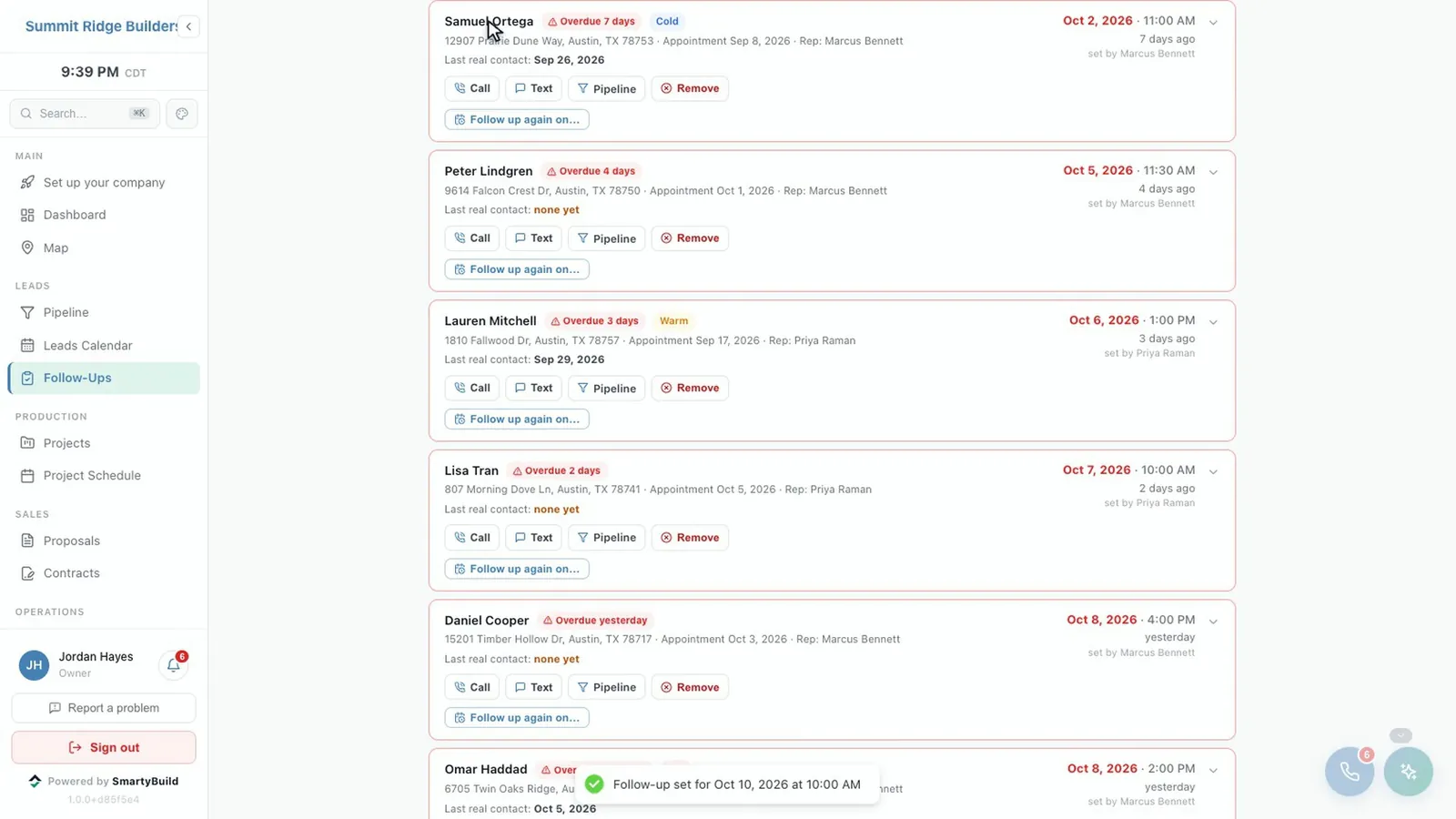
Leads that do not go cold.
Website and phone leads land in one pipeline, duplicates are caught, and follow-ups are tracked rather than remembered.
- Every lead from your website forms and your phone in one place
- Overdue follow-ups flagged, with managers alerted when one slips
- A missed call texts the caller back before they ring your competitor
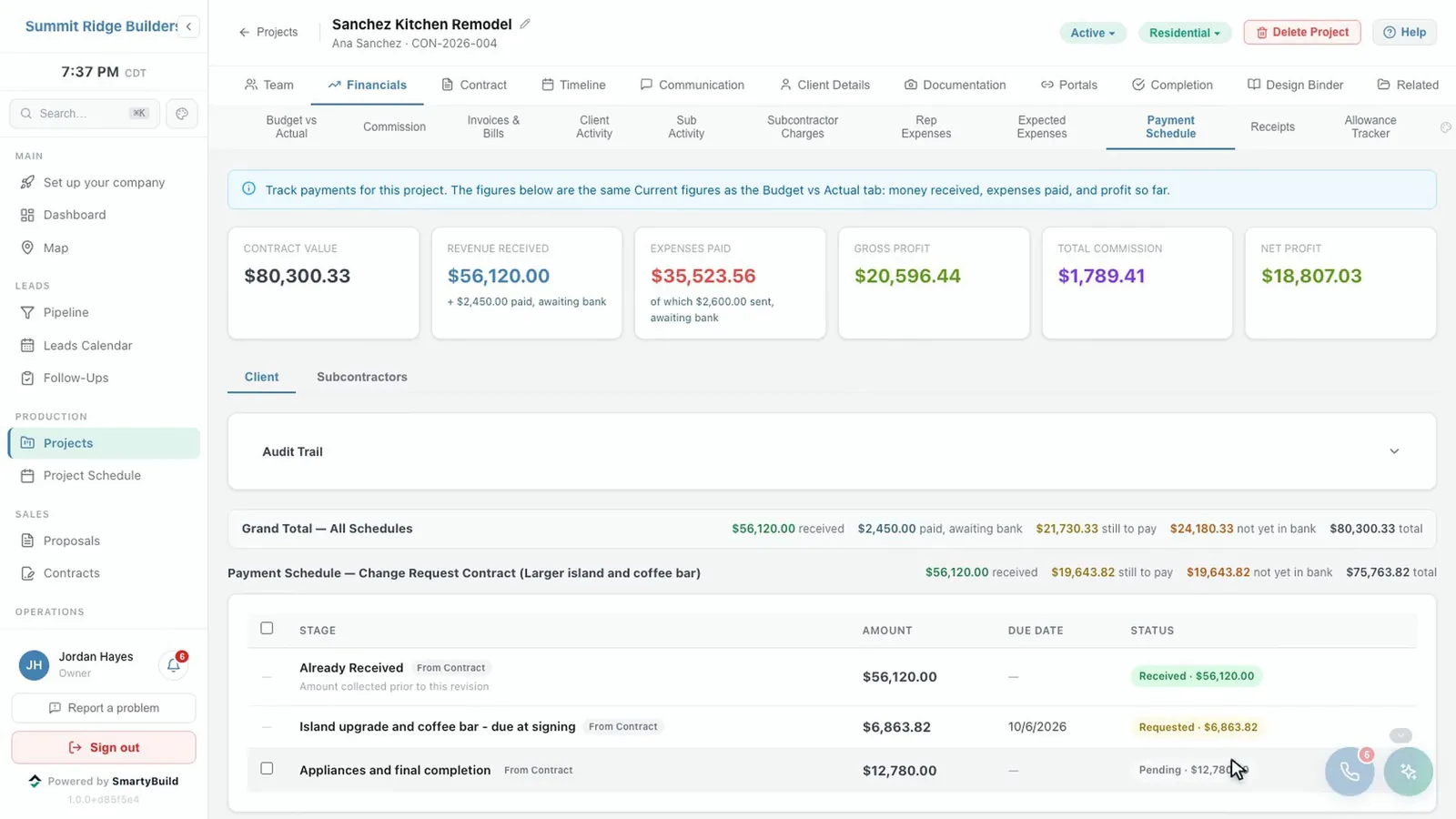
Know what every job has really collected.
Recording a payment says the client paid. Only a matched bank transaction says the money arrived, and only that moves the number. So the profit you see is profit you have.
- Payment schedules, invoices, card and bank payments
- A live bank feed, with deposits split across the jobs they paid for
- Change orders restate the contract; additional work adds to it
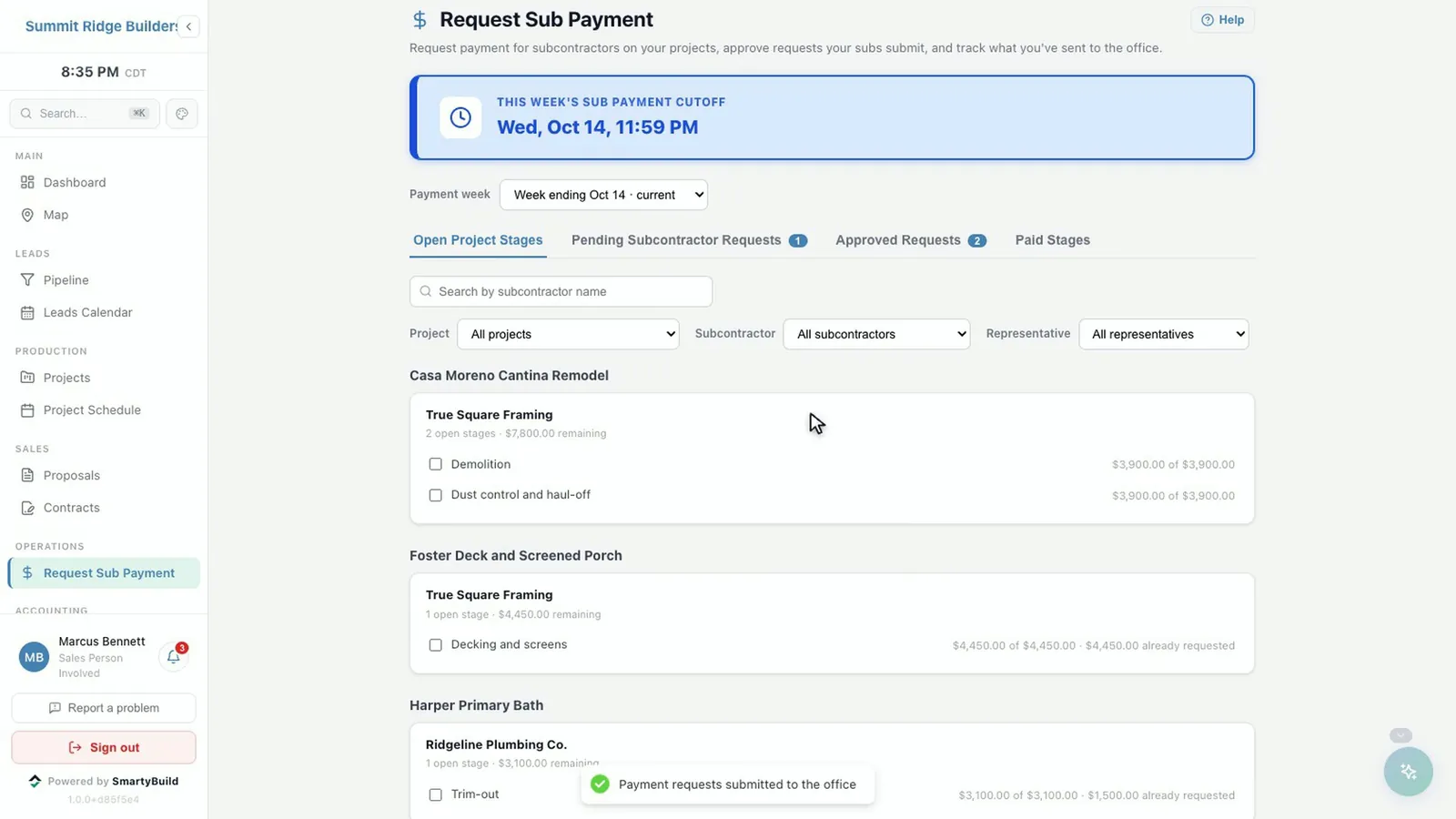
Pay subs in minutes, not a day a week.
Subcontractors get their own front door: their contracts, their scope and a portal where they request payment against the stages you agreed.
- Weekly approval runs with a clear cutoff, aware of bank holidays
- W-9 collection and IRS TIN verification
- Unlimited subcontractors, free on every plan
Keep more of every project payment.
Large invoices shouldn’t mean large processing fees. Accept ACH bank payments through SmartyBuild with Helcim, and give your customers the convenience of paying online.
Collecting payment can mean extra trips, manual follow-ups, and fees that eat into project margins. Checks may require pickup or mailing, followed by deposit and clearing. Wire transfers generally require your customer to initiate payment through their bank, and matching the transfer to an invoice may require follow-up.
ACH offers a convenient alternative: customers authorize a bank payment online through SmartyBuild’s Helcim integration, without arranging a check pickup or initiating a separate wire.
SmartyBuild also accepts credit cards through Helcim’s interchange-plus pricing: the card networks’ underlying cost plus a published Helcim margin. Depending on the cards your customers use and your qualifying card volume, this can cost less than standard flat-rate online processing.
How it works in SmartyBuild
- Customers pay an invoice from a link, by bank (ACH) or card, in Helcim’s secure payment window.
- The first time a customer pays by bank, they authorize their account in that same window. No separate form.
- The payment is applied to the invoice and the project’s payment schedule, and your team can be notified.
- It counts as received only once the Helcim deposit is matched in your bank feed.
- Helcim’s daily fee is split across that day’s payments, so each job carries its real processing cost.
In this example, a contractor collecting $1 million per month across 50 payments could save $4,350 annually compared with Buildertrend’s published client ACH fees.
Bank payments (ACH): published rates
Fees for receiving customer payments, not for paying subcontractors or vendors. The last four columns are the fee on one payment of that size.
| Provider | Published customer-payment ACH rate | $7,500 | $20,000 | $30,000 | $50,000 |
|---|---|---|---|---|---|
| SmartyBuild through Helcim | 0.5% + $0.25, capped at $6; above $25,000, $6 plus 0.05% of the amount above $25,000 | $6.00 | $6.00 | $8.50 | $18.50 |
| Buildertrend Client Payments | $15 flat per payment | $15.00 | $15.00 | $15.00 | $15.00 |
| Joist Payments | 1%, capped at $15 per payment | $15.00 | $15.00 | $15.00 | $15.00 |
| Jobber Payments | 1% | $75.00 | $200.00 | $300.00 | $500.00 |
| Housecall Pro | Standard 1%; specific plan rates may differ | $75.00 | $200.00 | $300.00 | $500.00 |
| QuickBooks (merchant-paid) | 1% ($1 minimum) on its public standard rate page; individual account terms may differ | $75.00 | $200.00 | $300.00 | $500.00 |
Helcim does not win every payment: a single $50,000 payment costs $18.50 through Helcim and $15 through Buildertrend or Joist. Total savings depend on your payment mix.
Above $25,000 Helcim charges the $6 maximum plus 0.05% of the amount above $25,000: $30,000 costs $6 + $2.50 = $8.50, and $50,000 costs $6 + $12.50 = $18.50. Helcim asks merchants to contact it before single ACH payments over $25,000.
An example: $1 million a month across 50 payments
An illustrative contractor, not a customer testimonial. Each provider’s fee is applied to each payment individually, including caps and Helcim’s charge above $25,000.
| Payment type | Count | Each | Monthly total |
|---|---|---|---|
| Smaller jobs and final balances | 20 | $7,500 | $150,000 |
| Mid-project progress payments | 15 | $20,000 | $300,000 |
| Larger project deposits | 10 | $30,000 | $300,000 |
| Major project milestones | 5 | $50,000 | $250,000 |
| Total | 50 | $1,000,000 |
| Provider | Monthly | Annual | Annual savings with Helcim |
|---|---|---|---|
| SmartyBuild through Helcim | $387.50 | $4,650 | — |
| Buildertrend | $750 | $9,000 | $4,350 |
| Joist | $750 | $9,000 | $4,350 |
| Jobber (standard 1%) | $10,000 | $120,000 | $115,350 |
| Housecall Pro (standard 1%) | $10,000 | $120,000 | $115,350 |
| QuickBooks public standard rate* | $10,000 | $120,000 | $115,350 |
Helcim for this mix: 20 × $6 + 15 × $6 + 10 × $8.50 + 5 × $18.50 = $387.50 a month. Against the standard published 1% rates of Jobber and Housecall Pro, the same mix would save $115,350 a year with each. *QuickBooks account-specific pricing has not been verified; enter your own rate in the calculator below.
Credit cards: the same mix, paid by card
Helcim charges the card networks’ underlying cost (interchange and network fees) plus a published online margin. The underlying cost below, 2.00% + $0.10 per payment, is hypothetical: it is not a Helcim quote or a verified average, and real costs depend on the cards your customers use.
| Qualifying monthly card volume | Margin |
|---|---|
| Up to $50,000 | 0.50% + $0.25 |
| Above $50,000 through $100,000 | 0.45% + $0.20 |
| Above $100,000 through $500,000 | 0.35% + $0.20 |
| Above $500,000 through $1 million | 0.25% + $0.15 |
| Above $1 million | 0.15% + $0.15 |
Helcim qualifies the tier on a three-month rolling average of card-based transactions, so ACH volume does not count toward card tiers.
| Provider | Published online card rate | Monthly | Annual savings with Helcim |
|---|---|---|---|
| Helcim (illustrative) | 2.00% + $0.10 hypothetical underlying cost, plus 0.25% + $0.15 margin | $22,512.50 | — |
| Buildertrend | 2.99%; American Express not accepted | $29,900 | $88,650 |
| Housecall Pro | 2.99% standard; 3.49% for Amex and commercial cards | $29,900 | $88,650 |
| QuickBooks | 2.99% public standard; account rates may differ | $29,900 | $88,650 |
| Jobber | 2.9% + $0.30 for online card payments | $29,015 | $78,030 |
| Joist | Up to 3.49% + $0.49; verify your rate | $34,924.50 | $148,944 |
The ACH and card examples each assume all of the modeled volume uses that one method. Do not add their savings together.
Compare your processing costs
The calculator needs JavaScript. The tables above show the same example worked out.
Your monthly payment mix
Start from the example, then change any group, or add and remove groups.
A volume button keeps each group’s payment count (50 payments in the example) and scales every payment amount by the same factor. The groups stay editable afterwards.
payments a month collected a month
Underlying card costs (hypothetical)
Interchange and network fees vary by card. These defaults are for illustration only; they are not a Helcim quote.
Enter the rate from your own processing agreement or statement.
Result
| Provider | Monthly fees | Annual fees | Annual savings with Helcim |
|---|
Fee on each payment
| Payment type | Amount | Helcim |
|---|
Negative figures mean Helcim would cost more for that mix.
QuickBooks customer-paid ACH option
QuickBooks also documents a separate option where the customer pays a $25 ACH fee, subject to eligibility and invoice settings: for example, invoices over $125 and under $100,000, with the invoice’s other online payment options turned off, and no partial ACH payments. That fee is paid by your customer, not your business, so it is not part of this comparison of business-paid fees.
What these figures include
- Processing fees only; software subscriptions and other optional fees are excluded.
- Actual agreements, card mix, negotiated discounts and transaction limits can change results.
- Examples exclude returns, disputes, verification, international/FX fees, instant payouts and optional services.
- Helcim’s additional 0.4% recurring-payment fee is excluded from these one-time payment examples.
- High volumes and large payments require the applicable provider’s approval.
- ACH requires authorization and settlement time, and remains subject to returns and disputes.
- Savings are estimates, not guarantees.
Sources
Published U.S. rates in USD, checked .
What people ask before they switch.
Is there a free trial?
No. Instead every plan has a 30-day money-back guarantee: if SmartyBuild is not right for your company, ask within 30 days and you get your money back. We would also rather show you first, so book a demo before you buy.
Do subcontractors count toward my plan?
No. Subcontractors are unlimited and free on every plan. They use their own portal for contracts, scope, payment requests and W-9s, and they do not need a SmartyBuild login. Clients signing or paying through a link do not count either.
Can I bring my data over from what I use now?
Yes, and help with it is included on every plan. Leads come in from a spreadsheet, contacts from Google, and the PDF forms you already use become live templates. More on switching.
Who owns my data?
You do. Every company gets its own installation and its own database, never shared with another contractor. You can export your data at any time, and for 30 days after your account ends. Security and your data.
See it running your business.
Thirty minutes, with your own jobs in mind. If it is not a fit, we will tell you.